
Build Your Own AI Sales Assistant with Claude
You’ll leave with a workflow you can run tonight.


Every now and then, I get a question:
"Why shouldn't I just build my own AI sales assistant with Claude?"
My answer is always the same:
You probably should.
Seriously.
The cost of building AI has collapsed. If you’re a technical founder or have an engineer on your team, you can stitch together transcripts, prompts, CRM updates, and follow-up emails in a weekend. You don’t need permission. You don’t need a six-figure software budget.
And that’s exciting.
The companies that win over the next five years would be the ones leveraging AI wherever the processes allow.
That’s why this week’s newsletter is different.
I’m showing you how I’d build a sales assistant myself using Claude.
Will it be perfect? No.
Will it save your reps hours every week? Probably.
Will you eventually discover all the shortcomings of this approach, like keeping context, remembering previous calls, automating the workflow, integrating with your CRM? Also yes.
But I’d rather you understand the problem first than just take my word for it.
If you build it yourself, you’ll have a much better appreciation for what matters.
-Amit, Founder, WingRep

I was on a call last week with a VP of Sales at a Series B company.
She told me her reps spend 6 minutes on a discovery call and 18 minutes after, logging notes, updating the CRM, writing follow-ups.
I asked her: "Why don’t you set Claude in that 18-minute loop? What if it listened to the call, already knew your qualification framework, and just... handed the rep everything they needed?"
She looked at me like I'd proposed magic. But that's not magic.
We've spent the last year helping sales teams across logistics, healthcare, cybersecurity, and networking automate this exact workflow.
So, let’s build it together.
The 4-Core Sales Elements
Every sales call creates four things that are generally done before the next one:
- Notes. A transcript of what was said, the key moments, the objections.
- Qualification. Does this deal fit? What's the process? What's the timeline?
- CRM entry. The deal moves in the pipeline. Fields get filled. The forecast updates.
- Follow-up. An email the rep can send, customized to what happened in the call.
Right now, your reps do this manually.
Claude can do all four things in 90 seconds. Without the rep touching anything.
Here's what that looks like:
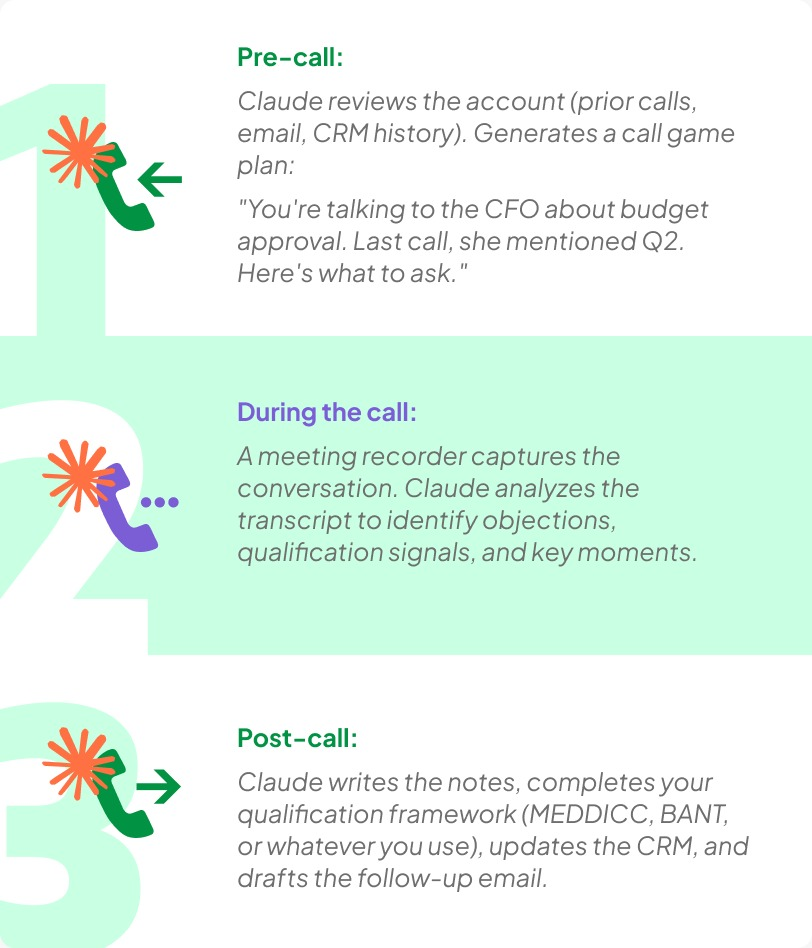
The rep reads it, clicks approves, moves to the next call.
BUILD IT LIVE
Here's how you actually build this. It's simpler than you think. Six steps (three must-haves, two bonuses, one reality check).
Step 1: CAPTURE
Don't paste a call once. Keep one running markdown file per rep.
Enter this into claude:
C:\reps\> dir
rep-jordan.md rep-priya.md rep-marcus.md
C:\reps\> claude open rep-jordan.md + today's call
The file lives. Claude has a memory you control. Every call gets appended. This is the foundation.
Step 2: COACHING LEDGER
It’s the prompt that does the real work. Paste the rep's log plus the new call. Ask Claude:
Enter this into claude:
You keep a coaching log for one of my reps. I'll paste
the log, then a new call. Update it:
1. Add a dated entry, 2 lines.
2. Take the LAST "next focus." Did it show up in
THIS call? Quote the moment, or say it didn't.
3. Give ONE specific focus for next call.
4. Update a "patterns" list up top.
The output looks like:

Step 3: SCORECARD
Hand the markdown back to Claude and ask for a one-file HTML scorecard.
Enter this into claude:
Take this log and build a single self-contained HTML
scorecard: rep + current focus, last 5 calls showing
focus stuck (green) or slipped (red), top recurring gap.
Now coaching becomes glanceable. One file. No tabs. No exporting. One link you send to the rep: "Here's your 5-call trend."
BONUS #1: A 60-SECOND PRE-CALL GAME PLAN
Before the call, not after. Most reps wing it; this is the edge.

It takes 60 seconds. Reps get the edge before they dial.
BONUS #2: PRACTICE ON CLAUDE, NOT THE CUSTOMER

This is low-stakes. The real call isn't the first try.
THE CATCH
Here's where it falls short (and why WingRep exists):
❌ You hand-keep a file per rep and paste both the log and the call every time. Skip a week, it rots.
❌ Claude never actually hears the call. If your transcription is manual (or incomplete), Claude's answer is only as good as your transcript. If you're using a tool that doesn't auto-integrate, your coaching never reaches the rep in time to stick before the next call.
❌ Nothing reaches your CRM. You still have to copy it over by hand.
❌ No pre-call reminders that fire automatically, no nudge mid-call. It's all you remembering to paste, to prompt, to check the scorecard.
This approach works. It's genuinely useful, genuinely a chore. But it requires the manager (or engineer) to stay in the loop, manually feeding Claude, and remembering to look at the output.
That's where automation comes in.
WHAT IF IT RAN ITSELF, AND REMEMBERED?
The workflow above works for a single call. But what if Claude remembered every call?
What if Claude knew:
- Every call Sarah had with you (and what she asked)
- Every objection she raised (and how you handled it)
- Everything she said she cared about (timeline, cost, implementation speed)
- Every call after that (did she ask again? Did the objection change?)
Then the coaching loop looks like this:
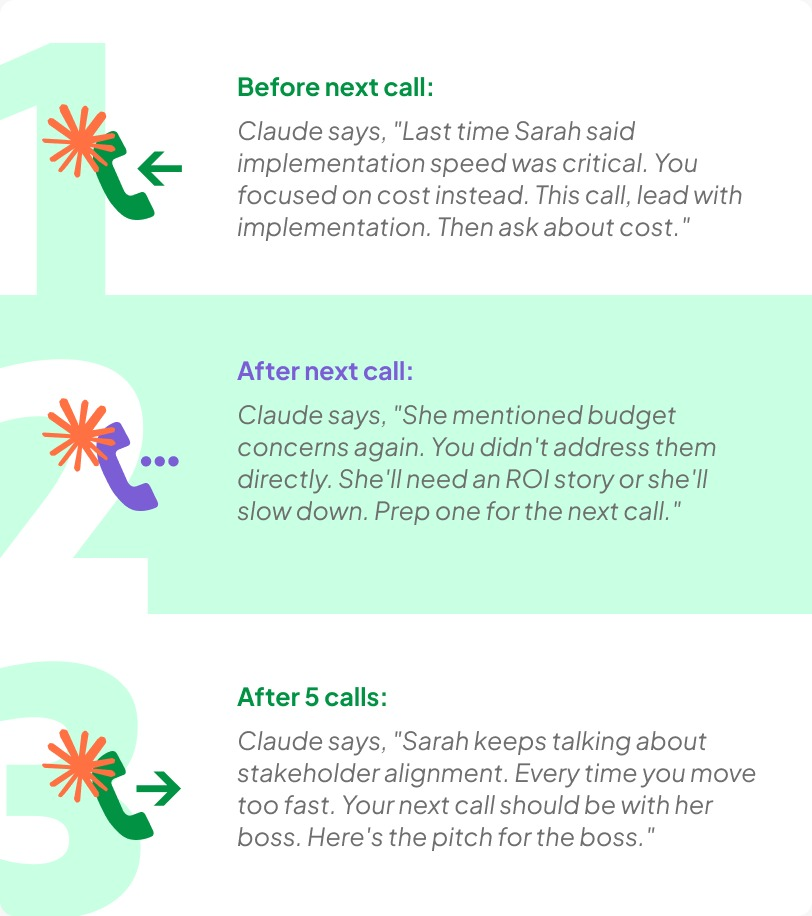
The rep doesn't have to remember. The manager doesn't have to take notes. Claude does.
SAME LOOP. NO FILES. NO PASTING.
Here's the thing that separates this from every other "AI sales tool" you've looked at:
No files: You don't export anything. You don't download a PDF of notes. There's no artifact you have to manage.
No pasting: The outputs (notes, CRM entry, follow-up email) don't live in a separate tool. They come to you in your email. Or they update your CRM directly. Or they live in a Slack thread.
No new behavior. The rep doesn't have to log in, click through a dashboard, or change their motion. They do what they always do (sell), and Claude handles everything else.
This is the part that matters for adoption. Tools fail because they ask reps to do extra work.
Claude doesn't ask for anything. It just shows up in the work that's already happening.
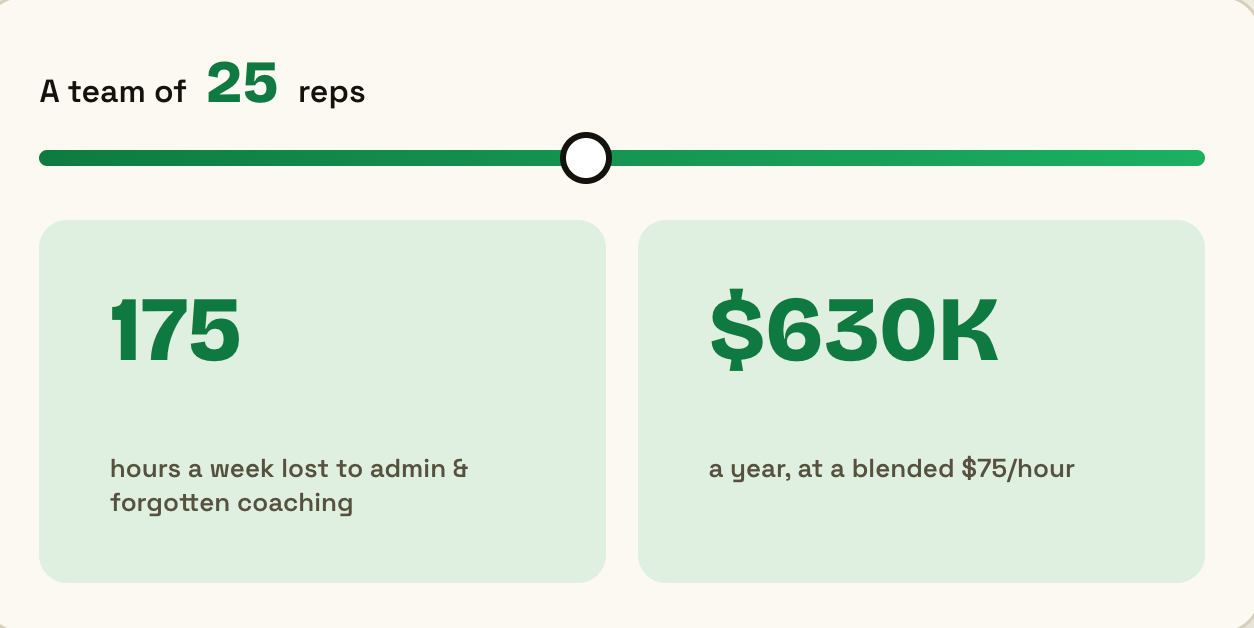
THE SOFTWARE ISN’T THAT EXPENSIVE. IT'S THE HOURS.
Let's do the math.
Current state:
- 1 rep, 8 calls/day
- 18 minutes post-call work per call (notes, CRM, follow-up, debrief)
- That's 144 minutes of admin per day = 2.4 hours/day
- Per year: 600 hours of admin work (144 min × 250 working days)
- Cost: 1 rep at $120K salary = $48/hour loaded = $28,800/year in rep time on admin
With Claude:
- Same rep, same 8 calls
- 2 minutes to review and send Claude's outputs (notes already written, follow-up already drafted, CRM already updated)
- That's 16 minutes of admin per day = 0.27 hours/day
- Per year: 67 hours of admin work
- Cost: $3,200/year in rep time
- Freed-up time per rep: 25 hours/week of selling time
The software doesn't cost much. The hours do. Claude gives them back.
WHERE THIS LEAVES YOU
You have two choices:
Option 1: Use what you just built with Claude
Use Claude's API + a simple workflow tool (Zapier, Make, or custom). Connect it to your CRM. Set it up for your team.
Best for: teams with technical chops who want full control. You get to customize everything. You own the data. But you also own the support.
Option 2: Run it with Wingrep (3-week trial)
What you built in an hour, we’ve continued building on for over a year. We can set it up on your actual calls, with your reps, on your deal data, for 3 weeks, no upfront cost.
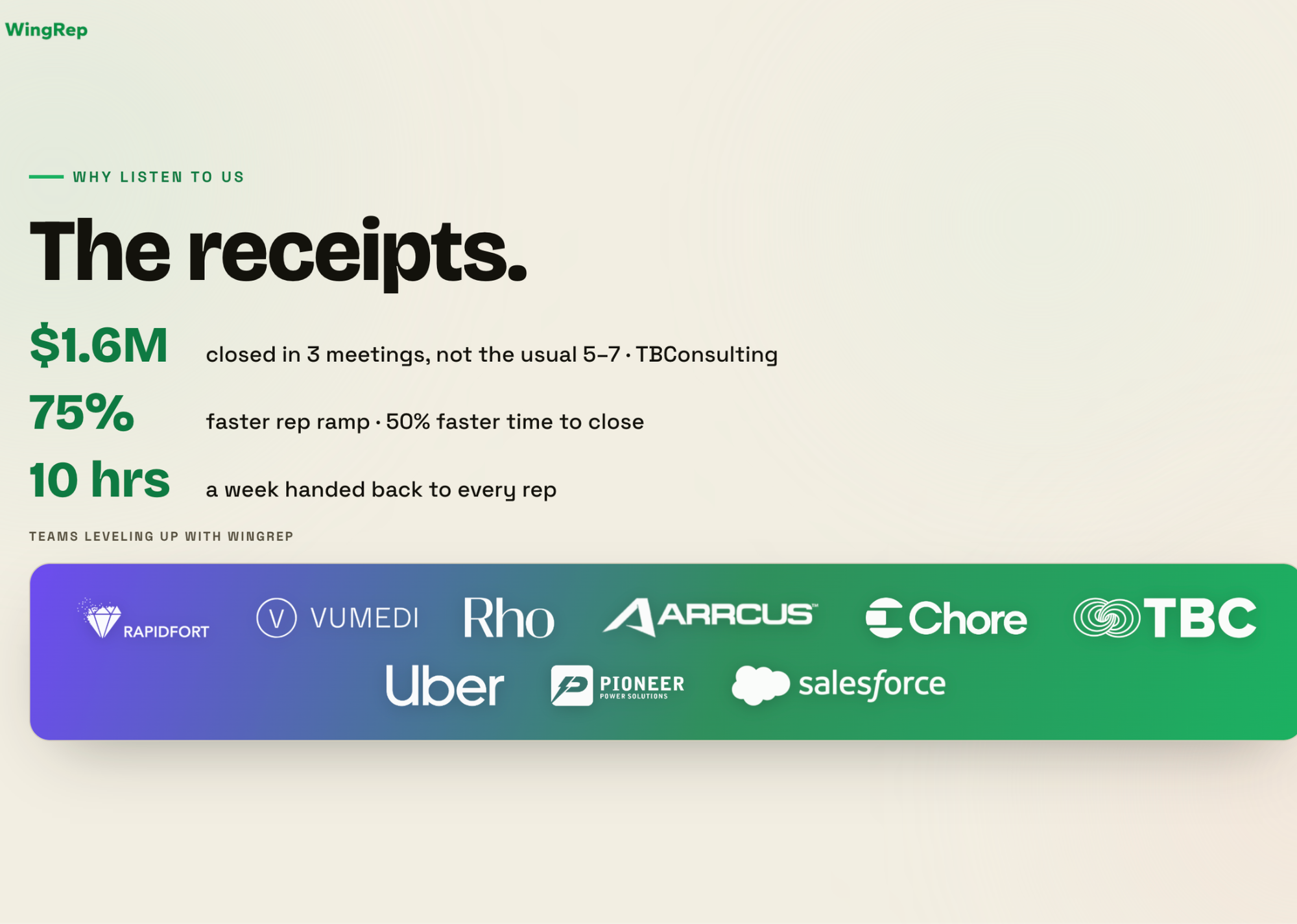
Whether you build this yourself or run it with us, you're walking away with a system where post-call work doesn't require a human.
If you want to try Option 2, you can book a free strategy call here
Catch you next week,